
I’m sure you’ve seen this format, right next to JPEG as one of the most common file formats in the web today.
In this blog post, I’d like to discuss a bit of the history of PNG, why it’s used and scratch the surface of how it works.
PNG is a lossless compression
History of PNG
What is it used for?
Design intent:
- Web graphics
- Logos, UI Elements, Icons
- Images that need sharp edges and transparency
While JPEG is better suited for:
- Photos
- Smooth Color Gradients
- Small file sizes with acceptable quality
How does PNG work?
Uses a lot of the same core encoding methods as in text encoding algorithms such as zip files.
Lossless compression exploits redundancy.
Huffman codes – the most common code to represent a few bits allocated to more frequent data is huffman codes by taking the frequency (the number of times a pixel value is repeated)
Huffman codes treat pixels on an image independently but often in reality, we see pixels next to each other similar in value
– Extremely complex and slow
LZSS (Lempel-Zivv Scheme)
One compression method that tries to take advantage of repeating neighboring values is run length encoding, that will take the register the pixel values in an image line by line, and encode repeating values with the value followed by the number of times it is contiguously repeated.
Example
[0, 3, 3, 3, 4,
4, 6, 6, 6, 2,
1, 3, 2, 2, 8]
And in run length encoding, this would show [3][3], [6][3], [2][2].
Run line encoding can work really well for images where there are a lot of continuously similar values, but there are images with a lot of repetitive date where run length encoding doesn’t perform well, such as:
[0, 50, 0, 50,
50, 0, 50, 0,
0, 50, 0, 50,
50, 0, 50, 0]
There is repetition, but not continuous. Redundancy is handled across 2 pixels rather than 1.
This is where LZSS comes in, an algorithm used often in .zip files. LZSS capitalizes on backreferencing. That is, if I have a sequence of say, letters in an array, and as I iterate through each position, if I find a latter that matches one that was already referenced, I can backreference it to the original.
In LZSS, a “sliding window” array is defined along with a “lookahead buffer” and a “search buffer”. Say you have:
- Sliding window: 15 – this number can be redefined to be much larger
- Look ahead buffer: 11
- Search Buffer: Sliding window – lookahead buffer
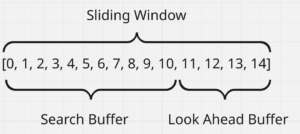
I would refer to this YouTube video from Reproducible as a fantastic animation and explanation on how LZSS works as it has a lot of steps: https://www.youtube.com/watch?v=EFUYNoFRHQI
The main takeaway is that:
- The sliding buffer is a fixed predetermined length which is used to analyze an array of characters to be encoded. Generally sliding window length is 32kb
- The search buffer is where we start to encode unique values relative to the lookahead buffer
- The lookahead buffer is the window in which we’re looking ahead to see if there is any repetition in a character or set of characters to be encoded
- When encoding, it takes the character being assessed in the lookahead buffer and looks for whether 1 or more characters is repeated, and then encodes its offset and length as an integer
- The offset is how far back within the sliding buffer was the last time this patter was seen and the length is the length of the pattern that was repeated at offset length
When LZSS encodes in this manner, you get run-length encoding at no extra cost. LZSS is more powerful in that it can encode repetitive patterns and combinations over long strings relative to the size of the lookahead buffer, but it can also perform run length encoding for simple encoding.
It can also be seen that using the LZSS premise of an offset and length for encoding, space is only saved in this method when a length (or pattern) of 3 or more characters is encoded, meaning it doesn’t encode single characters or pairs.
All that said, LZSS encoding would not work well on gradients, or incrementally increasing values across on image. in cases like this, where the LZSS encoding doesn’t work well, you can do two things:
- Find another solution, or,
- Transform the problem to be more manageable
Filtering
This is where filters come in to try to manipulate data in order to get repeating patterns. There are 6 main filters:
- None: No manipulation in data
- Sub: Subtracts X’ = X2 – X1, this works really well in situation where there’s constant differences between values such as 2, 4, 6, 8 as this can be translated into 2, 0, 0, 0 and encoded as [1][3]
- Up: This will be based on columns where X’ = X(UP) – X1 tries to find a 0
- Avg: X’ = X1 – (U + L)/2
- PAETH: X’ = X1 – ”, where ” = min( VL, VU, VUL), and VL = v – L, VU = v – U, VUL = v – UL and v = U + L – UL
But how do you decide what filter to use?
The LZSS needs to be performed on each row on each component in RGB. Since this would be computationally insane to try each combination of filters throughout each image matrix, it has a clever way of handling this.
It will generate a map of each filter per line and conduct a sum where the minimum is selected, which means this filter will be used as taking the lowest sum of absolute value generally correlates to the most number of reptitive data as a heuristic